Trucker AUX v0.4.0 Mod
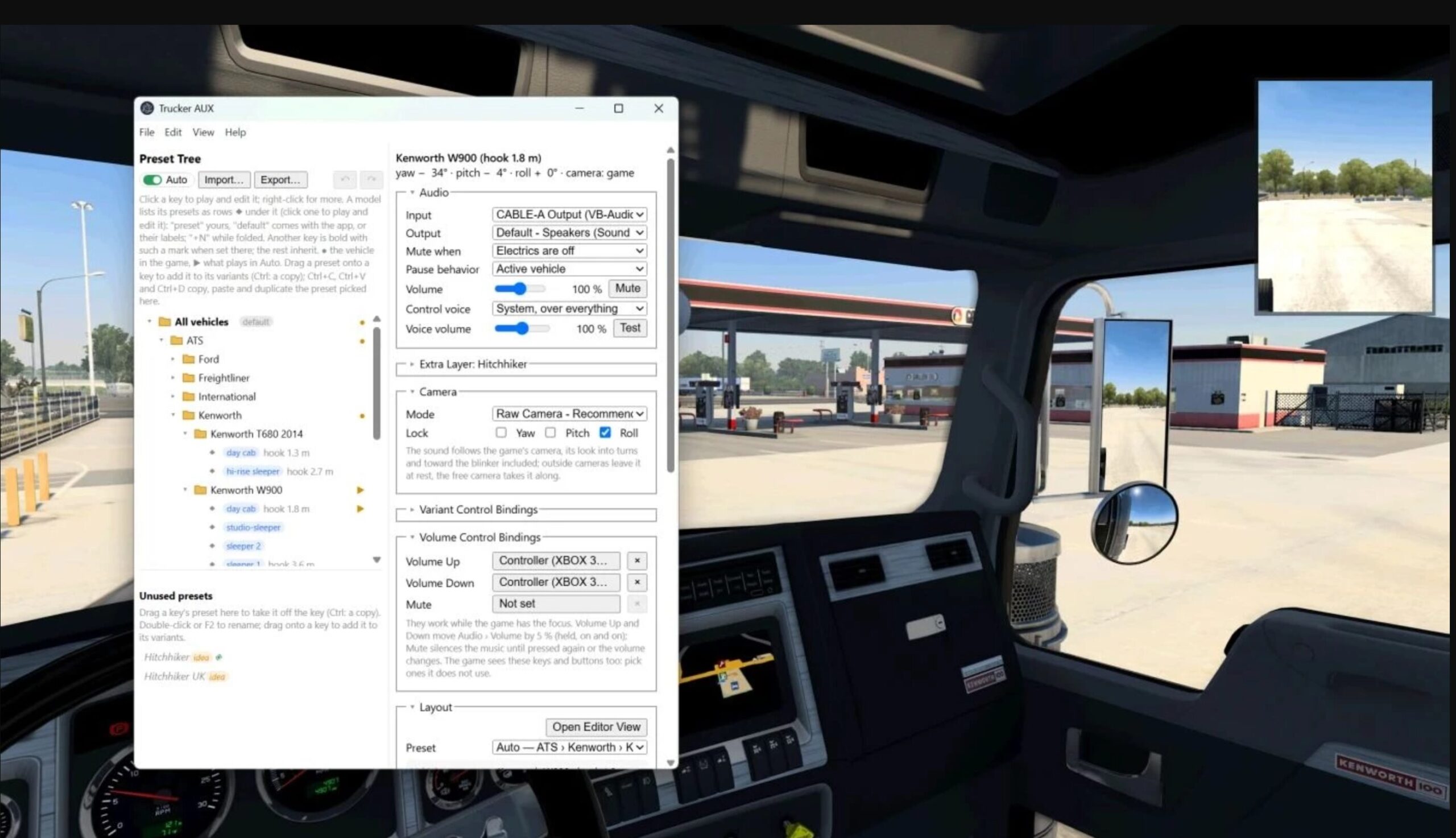
Trucker AUX plays audio from your PC, including Spotify, YouTube, and Discord calls, through virtual speakers positioned inside your truck’s cab. The sound follows your in-game head position: look out of the side window, and the door tweeter moves behind your ear.
A virtual audio cable driver is required.
Features
- Spatial audio that follows your view: HRTF audio tracks your in-game head position. With the bundled camera plugin, it also follows the game’s camera movements when looking into turns or towards the indicator.
- Any audio source: Supports anything that can output to a virtual audio cable, including ETS2 Local Radio.
- Automatic truck presets: Includes presets for a wide range of ATS and ETS2 trucks, switching automatically when you change vehicles. Cab variants are identified by fifth-wheel position, and settings for your own trucks are remembered by number plate.
- Visual speaker editor: Drag speakers into position using top and side views. Available speaker types include full range, small full range, tweeter, midrange, mid-bass, and subwoofer, with crossover settings.
- Keyboard and controller controls: Switch between preset variants while driving, adjust the volume, or mute the audio.
- Optional radio behaviour: Mute audio when the engine or electrics are off. A separate pause-menu preset provides a smooth audio transition.
- Multiple audio layers: Play a second source from another seat, such as a Discord call through the Hitchhiker preset to simulate a passenger talking alongside your music. Multiple virtual audio cables are required.
- Loudness matching: Keeps volume levels consistent between presets with different speaker counts.
Requirements
- Windows 10 or 11.
- A supported virtual audio cable, listed below.
- Stereo headphones. Disable virtual surround features such as DTS Headphone, Windows Sonic, or Dolby Atmos to avoid processing the spatial audio twice.
Virtual Audio Cable Options
- VB-Audio Virtual Cable: Includes one free cable. Additional cables are available as donationware and can separate sources such as music and Discord.
- Virtual Audio Cable: Paid software.
- Steam Streaming Microphone/Speakers: Installed automatically when setting up Steam Link through Remote Play.
Installation
- Install your chosen virtual audio cable.
- Download the latest Trucker AUX release and extract it anywhere on your PC.
- Run Trucker AUX and select Help > Install game plugins. This copies
scs-telemetry.dllandtrucker_aux_camera.dllinto the game’s/bin/win_x64/pluginsfolder. - In Trucker AUX, set Input to the virtual cable’s output side and Output to your headphones.
- In the Windows Volume Mixer, route your audio player to the virtual cable’s input side.
- Start the game, accept the SDK warning, and begin driving.